Productivity
Never leave the tool you feel most productive in
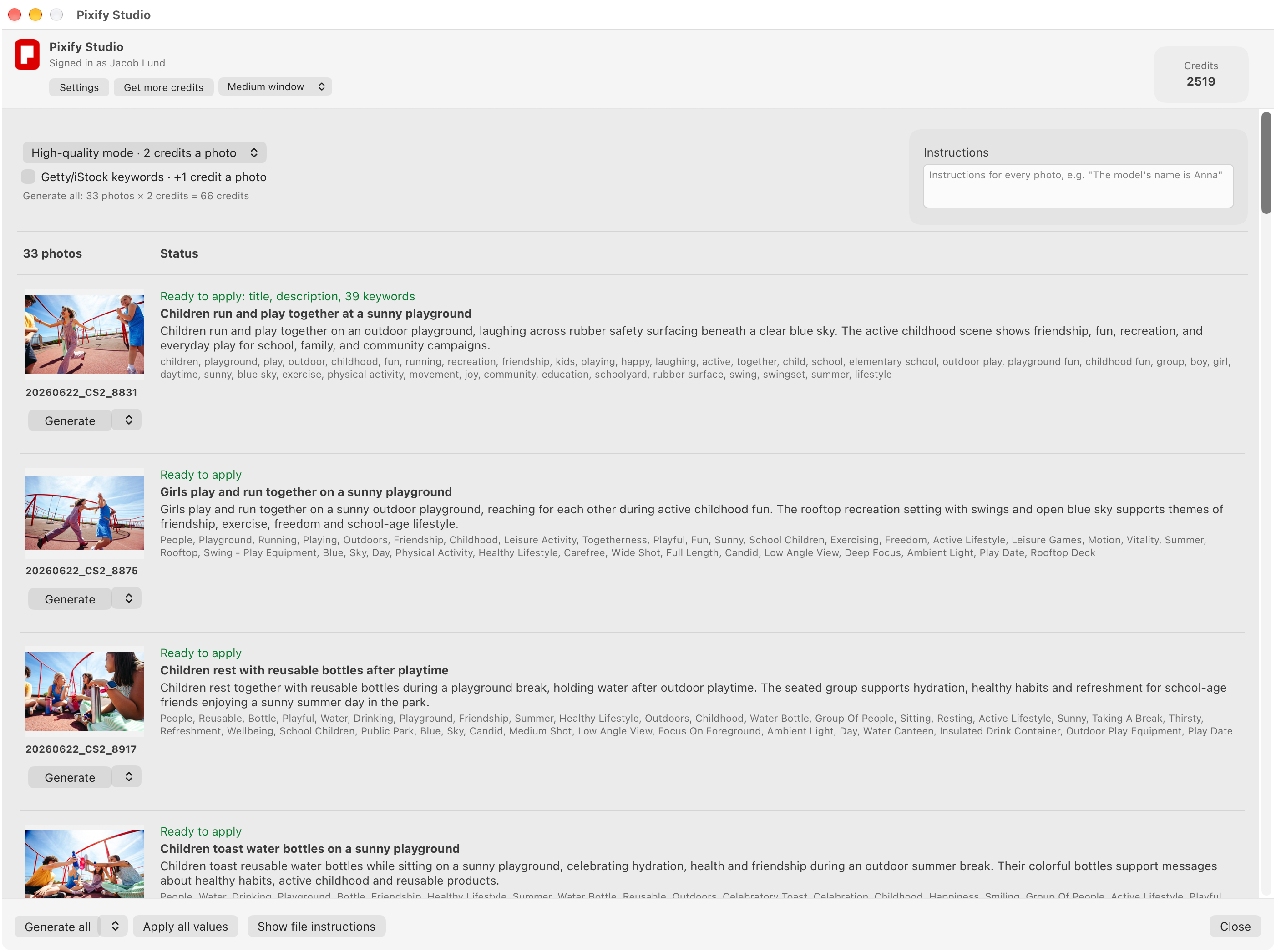
The Lightroom Classic plugin brings Pixify Studio's keywording into Lightroom. Select photos, press Generate, and the titles, descriptions and keywords come back into Lightroom's own fields. It is part of the Pro plan and keywords photos; clips are keyworded in Studio on the web.
Keyword a whole shoot
Select one photo or a few hundred and press Generate all. Each run goes to Studio as one batch, named with the day's date, so you can find it in Studio as well.
Choose the mode
Pick standard or high-quality mode, and tick Getty/iStock when the shoot is for ESP. The plugin shows what the run will cost in credits before you press Generate.
Apply when you are happy
Nothing is written until you press Apply all values. The words go into Lightroom's Title, Caption and Keywords in one step, and one Undo takes them back.
Read every result in its row
Each photo's row shows its new title, description and keywords beside the thumbnail, so you read the results before they touch your catalog.
Give it instructions
Give the whole catalog its instructions, and any photo its own: the location, the model's name, what to call the product, and what never to say.
Apply only the fields you choose
Keep all three fields, only the empty ones, or just the title, the description or the keywords. A field Studio did not write is left exactly as it was.